PostgreSQL WAL: How It Works
PostgreSQL WAL: How It Works
PostgreSQL's Write-Ahead Log (WAL) is the mechanism that makes crash recovery, replication, and Change Data Capture possible. Every change to the database is recorded in the WAL before the actual data files are modified. If the database crashes, it replays the WAL to recover. If a replica needs to catch up, it reads the WAL. If a CDC tool needs to stream changes, it decodes the WAL.
For the overview of how the WAL fits alongside MySQL's binlog and MongoDB's oplog, see What is a Transaction Log. This article goes deeper into the WAL's internals: the write path, record structure, checkpoints, replication slots, and monitoring.
The Write Path
When you execute an INSERT, UPDATE, or DELETE, the data doesn't go straight to disk. PostgreSQL follows a specific sequence to guarantee durability without sacrificing throughput.
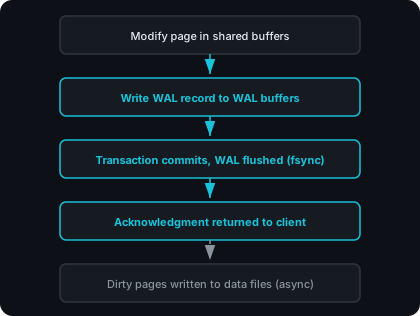
The critical guarantee: WAL is on disk before the commit is acknowledged. If the server loses power after the acknowledgment, the WAL is durable. If it loses power before, the transaction never committed and the client received an error.
Three internal functions track where WAL data is in this pipeline:
| Function | What It Returns |
|---|---|
pg_current_wal_insert_lsn() | Where records have been inserted into WAL buffers |
pg_current_wal_lsn() | Where WAL has been written to the OS (but not necessarily fsynced) |
pg_current_wal_flush_lsn() | Where WAL has been flushed to durable storage |
The gap between insert_lsn and flush_lsn represents WAL data that exists in memory but hasn't been forced to disk yet. Under synchronous commit (the default), this gap closes at every transaction commit. With asynchronous commit, the WAL writer background process flushes the gap every wal_writer_delay (default: 200ms), trading a small window of potential data loss for higher transaction throughput.
Segment Files
WAL data lives in the pg_wal directory as a series of segment files. Each segment is 16 MB by default (configurable at database initialization via initdb --wal-segsize).
Segment filenames are 24 hexadecimal characters encoding three pieces of information:
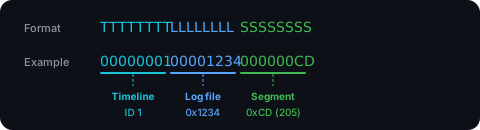
The timeline ID increments after point-in-time recovery or a standby promotion, creating a new branch of WAL history. In normal operation, it stays at 00000001.
You can convert between an LSN and its segment file:
SELECT pg_walfile_name(pg_current_wal_lsn());
Segment files are numbered sequentially and never wrap around. After a checkpoint, segments that are no longer needed for crash recovery are recycled (renamed to higher numbers) rather than deleted, up to min_wal_size (default: 80 MB). This avoids the filesystem overhead of creating and deleting files on every checkpoint cycle.
Inside a WAL Record
Each WAL entry consists of a fixed header followed by record-specific data. The header is defined in PostgreSQL's source (xlogrecord.h):
typedef struct XLogRecord
{
    uint32      xl_tot_len;   // total length of entire record
    TransactionId xl_xid;     // transaction ID
    XLogRecPtr  xl_prev;      // pointer to previous record in log
    uint8       xl_info;      // flag bits (operation type)
    RmgrId      xl_rmid;      // resource manager ID
    pg_crc32c   xl_crc;       // CRC-32C checksum
} XLogRecord;
A few fields worth understanding:
xl_rmid (resource manager ID) identifies which PostgreSQL subsystem generated the record. Heap records come from table operations. BTree records come from index modifications. XACT records come from transaction commits and aborts. Each resource manager knows how to replay its own records during recovery.
xl_prev links each record to its predecessor, forming a backward chain through the WAL. Recovery uses this for consistency checks. Tools like pg_waldump use it to traverse the log.
xl_xid ties the record to a specific transaction. This is what allows logical decoding to group all changes from a single transaction into one coherent event, which is central to how CDC preserves transaction boundaries.
The data that follows the header depends on the resource manager and operation type. A heap INSERT record contains the new tuple data. A heap UPDATE contains the new version of the tuple. The content is binary and not human-readable without a decoder like pg_waldump or the pgoutput output plugin.
Full-Page Writes
The first time a data page is modified after a checkpoint, PostgreSQL writes the entire 8 KB page image into the WAL. These are called full-page writes (FPW), also referred to as full-page images (FPI).
Why? Because disk writes are not atomic at the page level. An 8 KB PostgreSQL page spans multiple disk sectors (typically 512 bytes each). If the server crashes mid-write, the page on disk can end up as a mix of old and new data. This is called a torn page.
Full-page writes prevent torn pages from causing corruption. During crash recovery, PostgreSQL restores the full page image from the WAL, overwriting any partially-written page on disk. Subsequent modifications to the same page before the next checkpoint only log the change deltas, since the full image is already safely in the WAL.
The full_page_writes parameter controls this behavior (default: on). Disabling it is only safe on filesystems that guarantee atomic 8 KB writes (ZFS, for example). The PostgreSQL documentation warns that disabling it "might lead to either unrecoverable data corruption, or silent data corruption, after a system failure."
Full-page writes are a significant contributor to WAL volume. On write-heavy workloads with frequent checkpoints, they can account for a large fraction of total WAL output. Two ways to reduce the impact:
- Increase the checkpoint interval. Longer intervals between checkpoints (via
checkpoint_timeoutandmax_wal_size) mean fewer first-modifications-after-checkpoint and fewer full-page writes. The trade-off is longer recovery times after a crash. - Enable WAL compression. The
wal_compressionparameter (values:pglz,lz4,zstd) compresses full-page images within WAL records, reducing volume at the cost of CPU.
The pg_stat_wal view (PostgreSQL 14+) tracks full-page images via the wal_fpi column. Comparing wal_fpi to wal_records shows what fraction of your WAL activity is FPW overhead.
Checkpoints
A checkpoint is the process of flushing all dirty pages from shared buffers to the data files on disk. After a checkpoint completes, the database can recover from a crash by replaying only the WAL generated after that checkpoint, not the entire WAL history.
Two things trigger automatic checkpoints:
| Trigger | Parameter | Default |
|---|---|---|
| Time elapsed since last checkpoint | checkpoint_timeout | 5 minutes |
| WAL volume generated since last checkpoint | max_wal_size | 1 GB (soft limit, can be exceeded) |
Whichever threshold is reached first triggers the checkpoint. You can also run CHECKPOINT manually.
During a checkpoint, the checkpointer process:
- Writes all dirty shared buffer pages to their data files, spreading the I/O across
checkpoint_completion_target(default: 0.9) of the checkpoint interval to avoid I/O spikes. - Flushes WAL to disk.
- Records the checkpoint position in
pg_control, a small file that tells the recovery system where to start replaying.
After a checkpoint, WAL segments that predate it are no longer needed for crash recovery. Without archiving or replication slots retaining them, these segments get recycled. The system keeps at least min_wal_size (default: 80 MB) worth of segments for reuse.
If max_wal_size triggers checkpoints more frequently than checkpoint_warning (default: 30 seconds), PostgreSQL logs a warning suggesting you increase max_wal_size.
Recovery uses checkpoints as its starting point: read pg_control, find the last checkpoint's WAL position, replay everything forward from there. Longer checkpoint intervals mean faster steady-state performance but slower crash recovery.
WAL Levels
The wal_level parameter controls how much information the WAL contains. Each level includes everything from the levels below it.
minimal: Only what crash recovery needs. The WAL records physical page modifications but nothing for replication, archiving, or CDC. Produces the least WAL volume.
replica (the default): Adds enough for physical replication and WAL archiving. A standby server can receive the WAL stream and maintain an identical copy of the database. Also enables point-in-time recovery via base backup and WAL archival.
logical: Adds row-level change information that logical decoding needs to produce structured events (INSERT, UPDATE, DELETE with column values). Required for CDC and logical replication. Increases WAL volume, particularly for UPDATEs and DELETEs on tables with REPLICA IDENTITY FULL, because the WAL must include enough column data for downstream consumers to identify which row changed.
Changing wal_level requires a server restart. For CDC, set it to logical along with enough replication slots and WAL senders for your consumers:
wal_level = logical
max_replication_slots = 4    # at least 1 per CDC consumer
max_wal_senders = 4          # at least 1 per replication connection
For a comparison of what you can do with physical versus logical WAL consumption, see Logical vs Physical Replication.
Replication Slots
Without a mechanism to hold WAL in place, a CDC tool that disconnects and reconnects might find the segments it needs have already been recycled. Replication slots solve this.
A replication slot is a server-side bookmark that tracks a consumer's position in the WAL and prevents the database from discarding segments the consumer hasn't read yet.
Physical vs. Logical Slots
| Physical Slot | Logical Slot | |
|---|---|---|
| Purpose | Streaming replication (raw WAL bytes) | Logical decoding (row-level events) |
| Requires | wal_level >= replica | wal_level = logical |
| Output plugin | None | Required (e.g., pgoutput) |
| Database-specific | No | Yes (tied to one database) |
-- Create a physical slot:
SELECT pg_create_physical_replication_slot('standby_slot');

-- Create a logical slot:
SELECT pg_create_logical_replication_slot('cdc_slot', 'pgoutput');

-- Drop either type:
SELECT pg_drop_replication_slot('cdc_slot');
The Disk Usage Risk
This is the most common operational problem with replication slots. A slot that falls behind (because the consumer is down, slow, or disconnected) prevents WAL from being recycled. WAL files accumulate in pg_wal without bound, and the disk fills up.
The pg_replication_slots view shows each slot's status:
SELECT slot_name, slot_type, active,
       pg_size_pretty(
           pg_wal_lsn_diff(pg_current_wal_lsn(), restart_lsn)
       ) AS retained_wal,
       wal_status
FROM pg_replication_slots;
The wal_status column shows how close a slot is to losing its WAL:
| Status | Meaning |
|---|---|
reserved | Required WAL is within max_wal_size. Safe. |
extended | Required WAL exceeds max_wal_size but is still retained by the slot. |
unreserved | WAL will be removed at the next checkpoint. |
lost | Required WAL has already been removed. Slot is unusable. |
To prevent unbounded disk usage, set max_slot_wal_keep_size to a finite value. When a slot's retained WAL exceeds this limit, the database removes the WAL and invalidates the slot. The consumer must create a new slot and re-initialize from a snapshot.
Monitoring
Two views give the most useful WAL-related metrics.
pg_stat_wal (PostgreSQL 14+)
SELECT wal_records, wal_fpi, wal_bytes, wal_buffers_full
FROM pg_stat_wal;
| Column | What to Watch For |
|---|---|
wal_records | Total WAL records generated. Baseline for write throughput. |
wal_fpi | Full-page image count. A high ratio of wal_fpi / wal_records means FPW overhead is significant. Consider tuning checkpoint frequency or enabling wal_compression. |
wal_bytes | Total WAL volume. Use for capacity planning and replication bandwidth estimates. |
wal_buffers_full | Forced WAL buffer flushes. If this grows steadily, wal_buffers is undersized. |
pg_stat_replication
SELECT client_addr, state, sent_lsn, flush_lsn, replay_lsn,
       write_lag, flush_lag, replay_lag
FROM pg_stat_replication;
Three lag columns measure different stages of the replication pipeline:
| Column | What It Measures |
|---|---|
write_lag | Time until the consumer has written the WAL to its OS cache |
flush_lag | Time until the consumer has flushed the WAL to durable storage |
replay_lag | Time until the consumer has replayed (applied) the WAL |
For byte-level lag:
SELECT client_addr,
       pg_wal_lsn_diff(pg_current_wal_lsn(), replay_lsn) AS replay_lag_bytes
FROM pg_stat_replication;
If replay_lag grows over time, the consumer can't keep up with the write rate. If flush_lag is consistently high but write_lag is low, the consumer's disk I/O is the bottleneck. These patterns tell you whether to tune the consumer, the network, or the consumer's storage.
Where to Go from Here
This article covers the WAL's internal mechanics. The related articles in this series go into the systems built on top of it:
- Logical vs Physical Replication: when to use each mode of WAL consumption
- The pgoutput Protocol: how PostgreSQL's logical decoding converts WAL records into structured change events
- CDC Delivery Guarantees: how at-least-once and exactly-once delivery work in practice
- Checkpointing and Crash Recovery: how a CDC pipeline uses WAL positions to recover from crashes
For the broader picture of how the WAL fits into transaction log processing, see What is Transaction Log Processing.
We built Remac to work directly with the WAL. Remac reads PostgreSQL's WAL via logical decoding, preserves transaction boundaries, and delivers change events to Kafka, S3, Elasticsearch, PostgreSQL, and several other destinations. Remac currently supports PostgreSQL, with MySQL, MongoDB, SQL Server, and Oracle on the roadmap.
Take a look at remac.io.
Further Reading:
- Write-Ahead Logging (WAL). Official PostgreSQL documentation on the write-ahead pattern and why it exists.
- WAL Internals. Official documentation on segment structure, WAL record format, and internal mechanics.
- WAL Configuration. Tuning guide for checkpoints, WAL volume, and fsync behavior.
- WAL Reliability. Official documentation on full-page writes, fsync, and data integrity guarantees.
- Replication Slots. Official documentation on slot mechanics, WAL retention, and monitoring.
- Monitoring Statistics: pg_stat_wal. Column definitions for WAL activity monitoring views.